Server Power Actions & Information API
The Server API allows you to programmatically manage and retrieve information about your servers.
Using this API you can:
- Start, stop, restart, or force-kill servers
- Retrieve a list of all servers linked to your account
- Check server renewal status and expiration information
- Integrate server management into external applications, bots, dashboards, or automation systems
This reference covers authentication, permissions, available endpoints, request/response formats, and error handling.
Base URL
All API requests are made against:
https://api.zampto.netAuthentication
All endpoints except GET /health require an API key.
The API key must be sent using the Authorization header with the Bearer authentication format:
Authorization: Bearer <your_api_key>Example:
curl https://api.zampto.net/servers/list \
  -H "Authorization: Bearer your_api_key_here"
Your API key is validated on every request.
The key must:
- Exist in the database
- Have an active status
- Have the required permissions for the requested endpoint
Invalid or unauthorized keys will return:
401 UnauthorizedKeep your API key private.
Never expose API keys in client-side applications, public repositories, screenshots, or logs.
You can create and manage API keys from:
https://dash.zampto.net/settings/api
API Permissions
Some endpoints require specific permissions.
Each API key can have individual permissions assigned. If an API key does not have the required permission, the request will be rejected.
| Permission | Description |
|---|---|
View Server |
Allows retrieving information about a server, including renewal status |
List Servers |
Allows retrieving the list of servers associated with your account |
Start Server |
Allows starting a server |
Stop Server |
Allows gracefully stopping a server |
Kill Server |
Allows force-killing a server |
Restart Server |
Allows restarting a server |
Permissions are checked before executing the requested action.
Rate Limits
To ensure API stability and fair usage, requests are limited to:
| Limit | Window |
|---|---|
| 5 requests | per 10 seconds |
If the limit is exceeded, requests will temporarily fail until the rate limit window resets.
For integrations requiring higher limits, contact Zampto support.
Recommended practices:
- Cache information when possible
- Avoid unnecessary polling
- Use exponential backoff when retrying failed requests
Finding Your Server ID
Most server-related endpoints require a numeric server ID.
There are two ways to find your Server ID.
Option 1 — Using the List Endpoint
Send an authenticated request:
curl https://api.zampto.net/servers/list \
  -H "Authorization: Bearer your_api_key_here"
Example response:
{
  "success": true,
  "message": "Success",
  "data": [
    {
      "id": 1,
      "name": "Minecraft Server"
    }
  ]
}
The id field is the Server ID required by other endpoints.
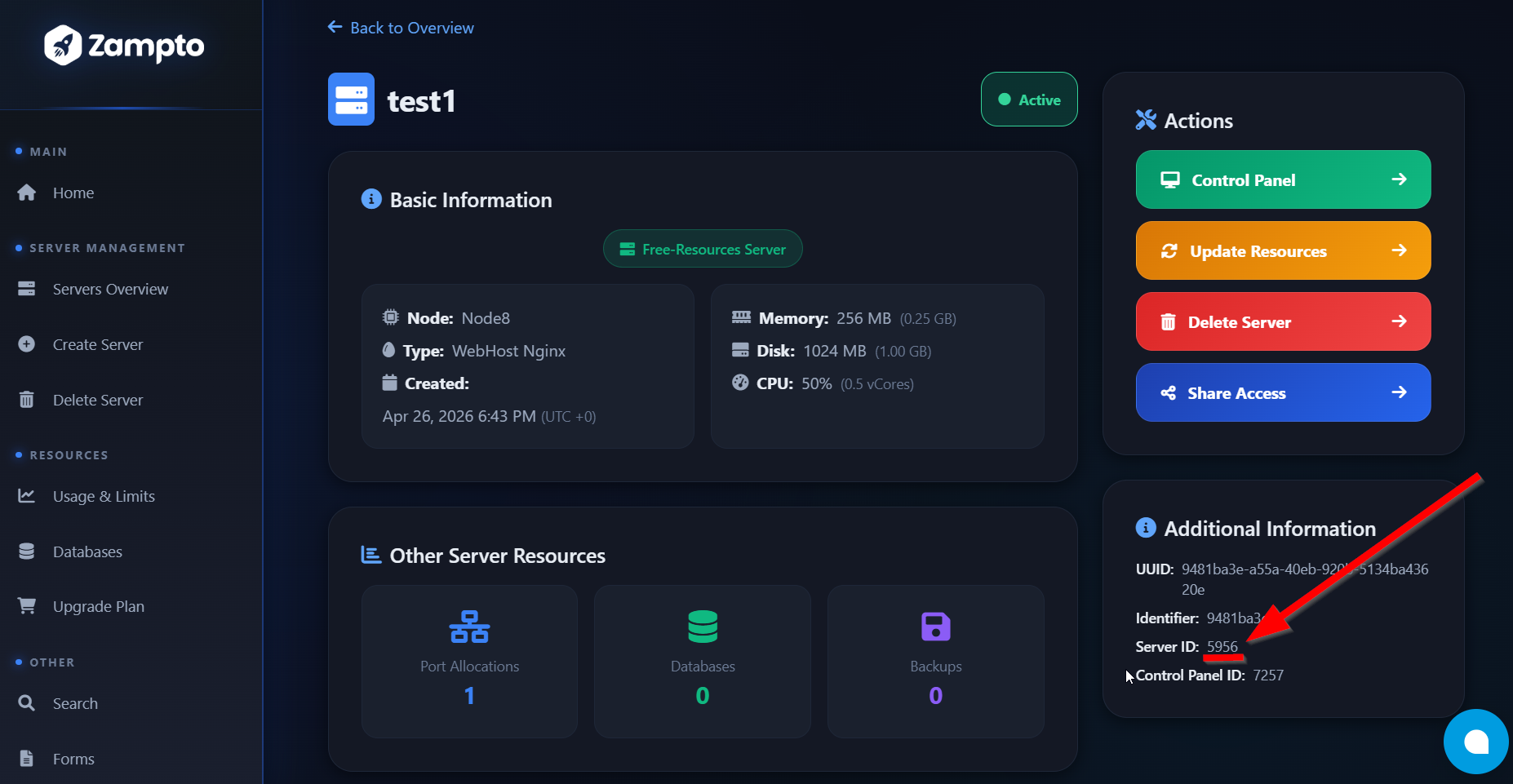
Option 2 — Using the Dashboard
- Open the Zampto Dashboard
- Go to your server list
- Open the server management page
- Find the Additional Information section
- Copy the displayed Server ID
Example:
In the examples below, Server ID 1 is used.
Replace it with your own server ID.
Endpoints
Power Control Endpoints
Power control endpoints allow you to manage the state of your servers.
All requests use a JSON body containing the server ID:
{
  "server": 1
}
Start Server
POST /server/action/start
Starts a stopped server.
Required Permission
Start ServerRequest
curl -X POST https://api.zampto.net/server/action/start \
  -H "Authorization: Bearer your_api_key_here" \
  -H "Content-Type: application/json" \
  -d '{"server":1}'
Body
{
  "server": 1
}
Success Response
200 OK
{
  "success": true,
  "message": "Success"
}
Stop Server
POST /server/action/stop
Gracefully stops a running server.
Required Permission
Stop ServerRequest
curl -X POST https://api.zampto.net/server/action/stop \
  -H "Authorization: Bearer your_api_key_here" \
  -H "Content-Type: application/json" \
  -d '{"server":1}'
Body
{
  "server": 1
}
Success Response
200 OK
{
  "success": true,
  "message": "Success"
}
Restart Server
POST /server/action/restart
Restarts a server by performing a stop operation followed by a start operation.
Required Permission
Restart ServerRequest
curl -X POST https://api.zampto.net/server/action/restart \
  -H "Authorization: Bearer your_api_key_here" \
  -H "Content-Type: application/json" \
  -d '{"server":1}'
Body
{
  "server": 1
}
Success Response
200 OK
{
  "success": true,
  "message": "Success"
}
Kill Server
POST /server/action/kill
Immediately terminates a server process.
This should only be used when a server is unresponsive and cannot be stopped normally.
Required Permission
Kill ServerWarning
Force-killing a server may cause data corruption or loss of unsaved data.
Request
curl -X POST https://api.zampto.net/server/action/kill \
  -H "Authorization: Bearer your_api_key_here" \
  -H "Content-Type: application/json" \
  -d '{"server":1}'
Body
{
  "server": 1
}
Success Response
200 OK
{
  "success": true,
  "message": "Success"
}
Server Renewal Status
GET /server/renewal
Returns the renewal and expiration status of a server.
This endpoint allows to check whether a server requires renewal and how much time remains before expiration. This endpoint cannot be used to renew a server; you can only renew a server manually via the dashboard.
Required Permission
View ServerRequest
The server ID is provided as a query parameter.
curl "https://api.zampto.net/server/renewal?server=10075" \
  -H "Authorization: Bearer your_api_key_here"
Parameters
| Parameter | Type | Required | Description |
|---|---|---|---|
server |
Integer | Yes | The numeric ID of the server |
Response Format
Expired Server — Renewal Not Required
Example:
{
  "success": true,
  "timestamp": "2026-07-10T12:44:43.000Z",
  "expiry_in": "expired",
  "required": "no"
}
This means:
- The server is expired
- Renewal is currently not required
Expired Server — Renewal Required
Example:
{
  "success": true,
  "timestamp": "2026-07-18T04:56:20.000Z",
  "expiry_in": "expired",
  "required": "yes"
}
This means:
- The server has expired
- A renewal action is required, a server can only be renewed using our Dashboard ( https://dash.zampto.net )
Active Server
Example:
{
  "success": true,
  "timestamp": "2026-07-22 08:19:06.000",
  "expiry_in": 13469,
  "required": "yes"
}
expiry_in is returned in seconds.
For example:
13469 seconds ≈ 3 hours and 44 minutesRenewal Response Fields
| Field | Type | Description |
|---|---|---|
success |
Boolean | Whether the request was successful |
timestamp |
String | Current server timestamp |
expiry_in |
Integer/String | Remaining time in seconds, or "expired" if the server has expired |
required |
String | Whether renewal is required (yes or no) |
Server Listing
GET /servers/list
Returns all servers associated with the authenticated account.
Required Permission
List ServersRequest
curl https://api.zampto.net/servers/list \
  -H "Authorization: Bearer your_api_key_here"
Success Response
200 OK
{
  "success": true,
  "message": "Success",
  "data": [
    {
      "id": 1,
      "name": "Minecraft Server",
      "memory": 4096,
      "disk": 51200,
      "cpu": 4,
      "backups": 3,
      "allocations": 1,
      "creation_timestamp": "2026-01-15T10:30:00.000Z",
      "uuid": "a1b2c3d4-e5f6-7890-abcd-ef1234567890",
      "identifier": "abc123def456",
      "main_allocation_port": 25565,
      "node_id": 1,
      "created_by": 42
    }
  ]
}
Health Check
GET /health
Returns the current API status.
This endpoint does not require authentication and can be used for:
- Uptime monitoring
- Service health checks
- External monitoring systems
Request
curl https://api.zampto.net/healthResponse
200 OK
{
  "status": "ok",
  "timestamp": "2026-05-03T12:00:00.000Z"
}
Response Format
All authenticated API responses follow a consistent JSON structure.
Successful Response
HTTP Status:
200 OKExample:
{
  "success": true,
  "message": "Success"
}
Error Response
Example:
{
  "success": false,
  "message": "Error description here"
}
Error Reference
| HTTP Status | Message | Cause |
|---|---|---|
400 |
Missing Authorization header |
The request did not include an Authorization header |
400 |
Invalid Authorization format. Use: Bearer <token> |
The Authorization header does not use the required Bearer format |
400 |
Invalid token |
The provided token is invalid or too short |
400 |
Invalid token format |
The token contains invalid characters or blocked patterns |
401 |
Unauthorized: Invalid API key |
The API key does not exist, is disabled, or cannot authenticate |
403 |
Missing required permission |
The API key does not have permission required for this endpoint |
400 |
Invalid JSON body |
The request body is not valid JSON |
400 |
Server parameter is required |
The server parameter was not provided |
400 |
Invalid server ID |
The provided server ID is not numeric |
403 |
Server not found, not existent, or unauthorized |
The server does not exist or does not belong to the authenticated account |
422 |
This server has not yet been synced, please wait 10 minutes and try again |
The server has not completed synchronization with the panel |
500 |
Failed to send power signal to server |
The panel rejected or failed the requested power operation |
500 |
Internal server error |
An unexpected server-side error occurred |
Best Practices
When integrating with the Zampto API:
- Store API keys securely
- Never expose API keys in frontend applications
- Cache server information where possible
- Respect API rate limits
- Handle error responses gracefully
- Use retries with exponential backoff for temporary failures
- Validate user permissions before performing actions
Support
If you encounter issues with the API or need additional permissions, contact Zampto support.